SEO MCP Server: Let Your AI Agent Check, Fix and Verify Pages with BACKLNK
Short answer
An SEO MCP server lets your AI coding agent run technical SEO checks on a live page without leaving your editor. Connect BACKLNK's free remote server with an API key, then have the agent run run_checks, fix the findings, deploy, and run verify_fixes to confirm what is fixed, new or still open.

Written by Miguel Santiago
Published · 12 min read
On this page
Connect BACKLNK's free MCP server to Claude Code, Cursor or VS Code, then follow the check, fix and verify loop on a test page: 10 of 16 findings fixed and confirmed.
An SEO MCP server gives your AI coding agent something it can't get from your repository alone: a view of the deployed page as a crawler fetches it. Your agent sees templates and components. Search engines and AI crawlers see the HTML, headers and robots.txt your server actually returns. An MCP server that runs technical SEO checks on the public URL closes that gap, and the agent can fix the code in the same session.
BACKLNK's MCP server is free and remote: one URL, one API key, nothing to install. Your agent gets six tools, and two of them frame a three-step loop. It checks a page, fixes what the checks find, and after you deploy, re-checks the page and compares the results with the first run. This guide covers BACKLNK's own server, which we built and tested; we did not evaluate other SEO MCP servers.
We ran that loop on a deliberately flawed test page. The first check returned 3 issues and 13 warnings. After the page edits, the re-check confirmed 10 of them as fixed and reported 6 as still open, because those were server settings we had left unchanged on purpose. This guide shows the setup for Claude Code, Cursor and VS Code, then walks through that run, including what the loop can't do for you.
- An MCP server lets a coding agent call outside tools. BACKLNK's server gives it technical SEO and AI-visibility checks on a public URL, with a recommendation for every finding and evidence such as an excerpt and line number wherever the page has something to point at.
- Setup is one command in Claude Code and a few lines of JSON in Cursor or VS Code, with a free API key from backlnk.com/developers.
- The loop is run_checks, then fix and deploy, then verify_fixes. A finding counts as fixed only when the re-check assessed it and found no problem.
- In our test, 10 of 16 issues and warnings were fixed and confirmed; the 6 server-level findings stayed open, as expected.
- Checks see only what is deployed to a public URL, and the MCP specification says a person should be able to deny any tool call.
What an SEO MCP server adds to your coding agent
The Model Context Protocol (MCP) is an open standard for connecting AI applications to outside tools and data. The MCP specification describes it as "an open protocol that enables seamless integration between LLM applications and external data sources and tools." A server exposes tools, and the specification calls tools "model-controlled": the model can discover and call them based on your prompt.
For technical SEO, that matters because many problems show up only in the delivered page. A missing Open Graph tag can come from a layout that never renders it, a blocked crawler from a robots.txt rule nobody remembers adding, a missing HTTPS redirect from the server. Fetching the page reveals them even when the code looks right.
The same basics apply to AI search. Google's guide AI features and your website says "There are no additional requirements to appear in AI Overviews or AI Mode, nor other special optimizations necessary," and that existing SEO fundamentals, such as allowing crawling in robots.txt, "continue to be worthwhile." An SEO MCP server puts the checks for those fundamentals where your agent already works.
BACKLNK's six MCP tools and default checks
The server lives at https://backlnk.com/mcp and uses the Streamable HTTP transport. In that transport, the MCP transports specification says, "each message is an HTTP POST to a single MCP endpoint." Your client sends the API key in the Authorization header with every request.
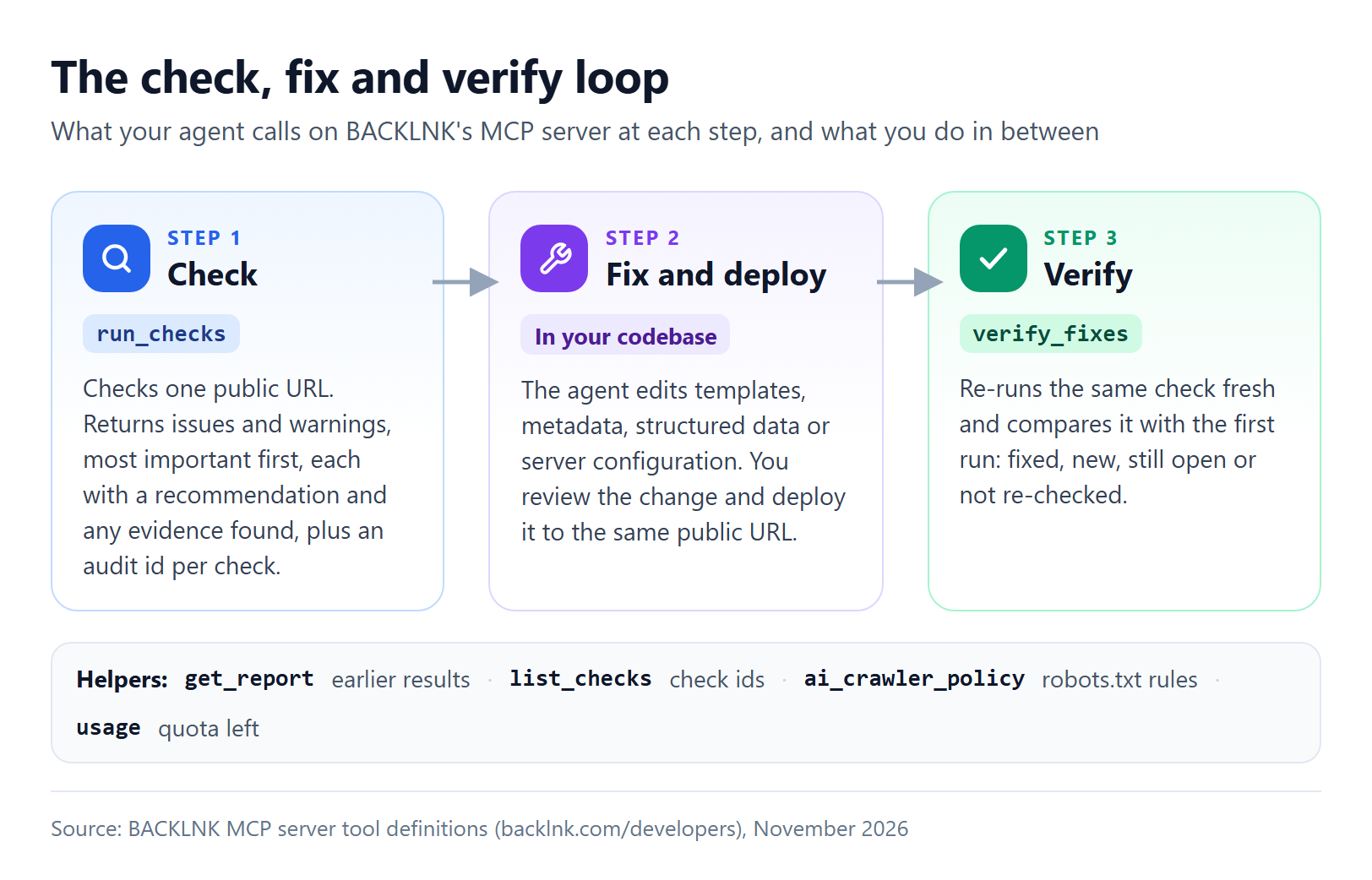
These are the six tools, as described on BACKLNK's developer page:
| Tool | What it does |
|---|---|
run_checks |
Checks one public URL and returns the issues and warnings to fix, most important first, each with a recommendation, plus an audit id per check |
verify_fixes |
Re-runs the same check fresh after your fix is deployed and lists what is fixed, new, still open or not re-checked |
get_report |
Returns an earlier report: the actions to take, or every finding |
list_checks |
Lists the checks, what each one looks at and its limits |
ai_crawler_policy |
Builds robots.txt lines that allow or block AI crawlers by purpose, with explanations |
usage |
Shows how much of the key's daily and hourly quota is left |
Without a list of checks, run_checks runs a quick default set: Meta & social preview, Structure & readability, AI crawler access, Redirects & headers, and Schema & entities. Your agent can name other checks from the 14 available to API keys, such as indexability, hreflang, sitemaps, internal links, duplicate content, images, llms.txt and page speed. Two checks on backlnk.com, Answer snippets and Intent & focus, use a hosted language model and aren't available through the MCP server or the API.
The key is free. Each key gets 100 checks per 24 hours plus an hourly limit, and the usage tool shows what's left. Each fresh check counts (results reused from a very recent identical check are free): in our test, one default run and its verification used 10 of the 100. Reports made with a key are private to it, and BACKLNK never publishes or indexes them.
How to connect BACKLNK to Claude Code, Cursor or VS Code
You need a free key and one configuration change in your client.
Step 1: Get a free API key
Open backlnk.com/developers, enter your e-mail address and confirm it from the link in the e-mail. The page that opens shows your key (it starts with bk_) once. Copy it somewhere safe: BACKLNK can't show it again. If you lose it, request a new key with the same address; confirming the new key revokes the old one.
Step 2: Add the server to your client
Claude Code. Run this once in your terminal, replacing YOUR_KEY:
claude mcp add --transport http backlnk https://backlnk.com/mcp --header "Authorization: Bearer YOUR_KEY"
This is the form the Claude Code MCP documentation gives for remote HTTP servers with a bearer token. Without a --scope flag, the server is added at local scope, which the documentation describes as loading "only in the project where you added it" and staying "private to you." That keeps the key out of version control. To use BACKLNK in every project, add --scope user: the documentation says user-scoped servers are available "across all projects on your machine while remaining private to your user account."
Cursor. Save this as .cursor/mcp.json in one project, or as ~/.cursor/mcp.json to use it in every project, as Cursor's MCP documentation describes:
{
  "mcpServers": {
    "backlnk": {
      "url": "https://backlnk.com/mcp",
      "headers": { "Authorization": "Bearer ${env:BACKLNK_API_KEY}" }
    }
  }
}
Cursor resolves variables such as ${env:NAME} in the headers field, so the key lives in an environment variable named BACKLNK_API_KEY and the file itself contains no secret.
VS Code. VS Code's documentation now lists several places for MCP configuration, and which one to use depends on the session. This setup uses the VS Code format in .vscode/mcp.json, a location VS Code keeps "available for compatibility" and labels deprecated in its guided flow. With the input below, VS Code asks for the key when it starts the server, so the file itself contains no secret:
{
  "inputs": [
    { "type": "promptString", "id": "backlnk-api-key", "description": "BACKLNK API key", "password": true }
  ],
  "servers": {
    "backlnk": {
      "type": "http",
      "url": "https://backlnk.com/mcp",
      "headers": { "Authorization": "Bearer ${input:backlnk-api-key}" }
    }
  }
}
Use it in a Local session: VS Code runs chat sessions on different harnesses, and you pick one in the Session Target dropdown. The VS Code MCP documentation says servers requiring interactive inputs "aren't forwarded to Copilot harness sessions." For the Copilot harness, the same documentation describes a global file, ~/.copilot/mcp-config.json, in the portable mcpServers format, and it asks you to review any server trust prompt before accepting it.
Other clients. Any MCP client that supports remote servers over Streamable HTTP works the same way. The configuration examples are also in the BACKLNK MCP repository on GitHub.
Step 3: Ask your agent to run the loop
In Claude Code, /mcp shows whether the server is connected. Then give your agent a page and the loop in one prompt, the example from BACKLNK's developer page:
Use BACKLNK to check https://example.com/pricing. Fix the issues it finds in this repository, most important first. When I've deployed, verify the fixes.
Replace the URL with a public page from the site in your repository. The next section shows what happens on each step.
If the tools don't appear, check three things: the URL is exactly https://backlnk.com/mcp, the header reads Authorization: Bearer followed by your key, and the key is the newest one for your address, because confirming a new key revokes the old one.
A worked example: one page, checked, fixed and verified
To show the loop on real output, we built a small pricing page for a fictional analytics company and gave it deliberate mistakes. It had a seven-character title, no meta description, no social preview tags, two H1 headings and a heading that skipped a level. Its robots.txt meant to block AI training and also blocked OpenAI's search crawler.
How we tested. The page ran on BACKLNK's own test server, not on a public website. We checked it on November 7, 2026 (UTC) through the MCP server of a BACKLNK test copy, which was configured to reach that test server. The public service checks public pages only.
No coding agent took part: we sent the tool calls an agent makes (run_checks, get_report, ai_crawler_policy, then verify_fixes) directly to the server and edited the page by hand between them. The setup steps above come from each client's documentation and BACKLNK's developer page. A real agent's reasoning and edits differ by client and model; this example documents the tool results.
What run_checks found
The first run_checks call ran the five default checks and returned 3 issues and 13 warnings:
| Check | Issues | Warnings | What it found |
|---|---|---|---|
| Meta & social preview | 2 | 5 | Missing required Open Graph tags, no share image, no meta description, a 7-character title, no favicon, no og:description, no twitter:card |
| Redirects & headers | 1 | 5 | HTTP served without a redirect to HTTPS; an HTTPS variant that doesn't reach a page; missing security and cache headers |
| Structure & readability | 0 | 2 | Two H1 headings; a skip from H2 to H4 |
| AI crawler access | 0 | 1 | A relative Sitemap line in robots.txt |
| Schema & entities | 0 | 0 | Nothing to fix (the summary noted that the page had no JSON-LD) |
Findings about something on the page came with evidence an agent can use to locate it, such as an excerpt, a CSS selector or a line number. Findings about something missing, such as an absent tag or header, explain what was checked instead. This is the heading finding, shortened:
{
  "ruleId": "structure.heading-skips",
  "status": "Warning",
  "title": "1 skipped heading level(s)",
  "recommendation": "Use the next level down for subsections (H2 → H3), or adjust styling with CSS rather than heading levels.",
  "evidence": [{
    "excerpt": "H2 “Starter” → H4 “What's included”",
    "location": "selector body > main > h4, line 16"
  }]
}
With the selector and line number, an agent can find the template that produced the element. The result also ends with an instruction for the agent: fix the findings in order, issues first, deploy, then call verify_fixes with each audit id.
The robots.txt mistake the summary revealed
The AI crawler check's summary said that 23 of 25 crawler tokens could access the page and 2 were blocked. It doesn't flag a blocked crawler as a problem, because blocking can be deliberate. A get_report call with every finding named the two: GPTBot, OpenAI's training crawler, and OAI-SearchBot, its search crawler.
That second block was the mistake. OpenAI's crawler documentation says "OAI-SearchBot is used to surface websites in search results in ChatGPT's search features," and that opted-out sites "will not be shown in ChatGPT search answers," though they can still appear as navigational links. The page's robots.txt said its goal was to keep pages out of AI training, which is GPTBot's job.
ai_crawler_policy with the preset "Block AI training, stay in AI search" returned the lines for that goal. It blocks the AI-training tokens of OpenAI, Anthropic, Google, Apple, Meta, Amazon and Mistral, plus Common Crawl's CCBot, and adds no lines for search crawlers, which keeps them allowed. The same rules are in the AI Crawler Policy Builder on backlnk.com, and our guide to blocking AI crawlers with robots.txt explains each token.
The fix
We changed the page and robots.txt as the findings recommended:
- a descriptive title and a meta description;
- the Open Graph and twitter:card tags, with a 1,200 × 630 share image;
- a favicon;
- one H1, and an H3 in place of the H4.
We also added a canonical link and WebPage and Organization data in JSON-LD, which no finding had asked for; our guide to schema markup for AI search covers that part. The head now includes these lines (shortened):
<title>Pricing: Starter and Growth plans | Acme Analytics</title>
<meta name="description" content="Compare Acme Analytics plans for online shops: Starter for one website with daily reports, Growth for several websites with hourly reports. 14-day trial.">
<link rel="canonical" href="http://site1.backlnk.test/pricing.html">
<meta property="og:title" content="Pricing: Starter and Growth plans | Acme Analytics">
<meta property="og:type" content="website">
<meta property="og:image" content="http://site1.backlnk.test/og-pricing.png">
<meta name="twitter:card" content="summary_large_image">
These are test-server addresses. On a real site, the canonical link and the Open Graph URLs point to the page's HTTPS address.
In robots.txt, the generated block replaced the two old groups, and the Sitemap line became a full URL. We deliberately left the server configuration alone: no HTTPS redirect, no new security or cache headers. That shows what the re-check reports when a fix hasn't happened. For the details behind these tags, see our guides to Open Graph tags and heading structure.
What verify_fixes confirmed
verify_fixes re-ran each of the five checks fresh on the same URL and compared the new results with the first run:
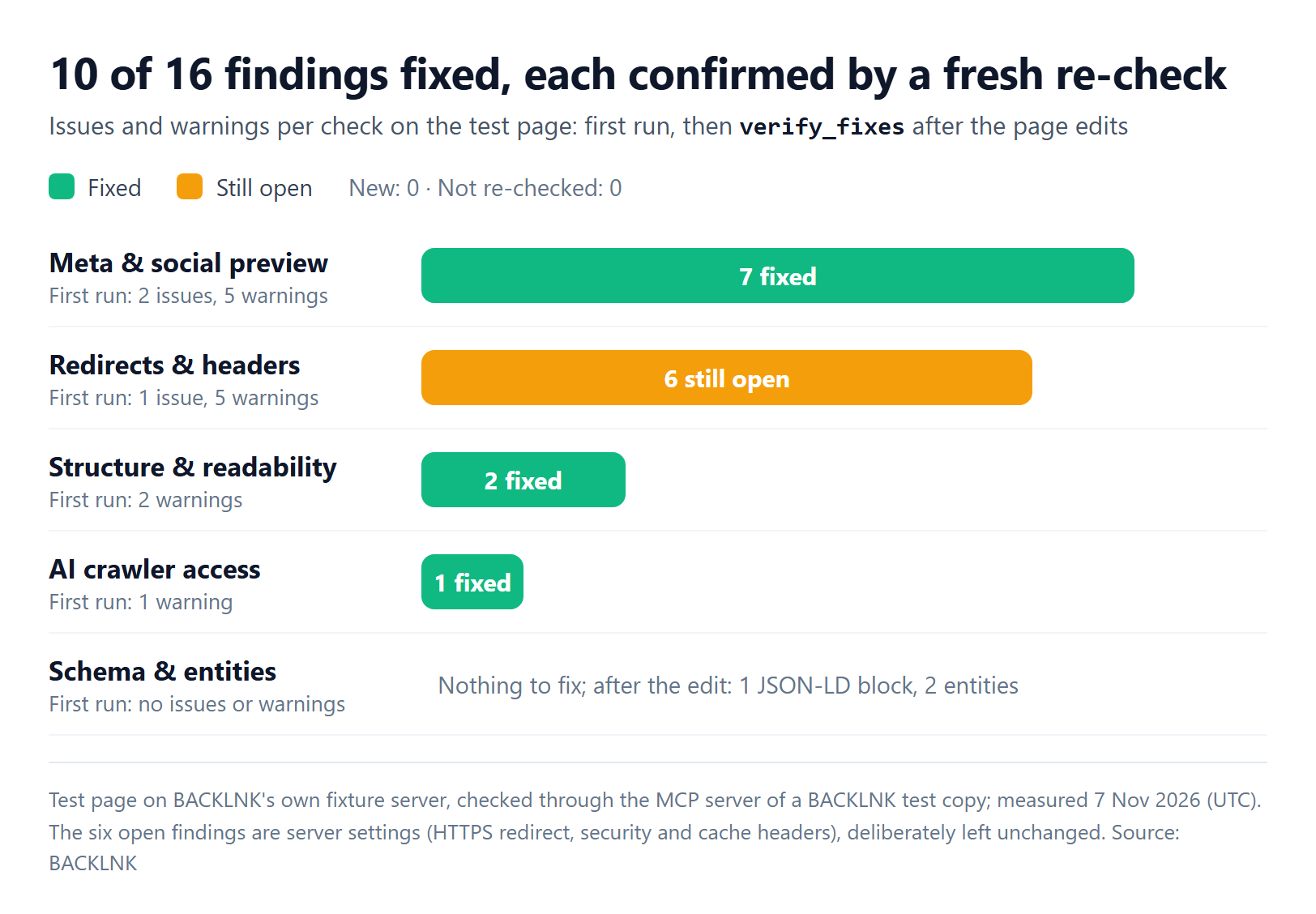
- Meta & social preview: all 7 findings fixed, from the two missing-tag issues to the missing twitter:card.
- Structure & readability: both heading findings fixed.
- AI crawler access: the Sitemap warning fixed. The summary now read 17 of 25 tokens allowed and 8 blocked, with OAI-SearchBot allowed again.
- Schema & entities: nothing to fix before or after; the page now carries 1 JSON-LD block with 2 entities.
- Redirects & headers: all 6 findings still open, which is correct, because the server didn't change.
No finding was new and none was "not re-checked." In total, 10 of the 16 issues and warnings were confirmed fixed by a fresh check, and the 6 left were exactly the ones we hadn't touched.
How to read fixed, new, still open and not re-checked
verify_fixes sorts every finding from the first run, plus anything new, into four groups:
| Result | Meaning | What to do |
|---|---|---|
| Fixed | Flagged before; the re-check assessed the same rule and found no problem | Nothing |
| New | Not flagged before; flagged now | Check whether your change caused it |
| Still open | Flagged in both runs | The fix isn't live yet, or didn't address the cause |
| Not re-checked | Flagged before, but the re-check couldn't assess it | Don't treat it as fixed; re-run when the page is reachable |
When the re-check can't assess a finding, BACKLNK says so instead of claiming a fix, so a finding never counts as fixed just because it's no longer reported.
Limits and safety rules to know
- Deploy before you verify. The checks fetch the public URL. A change in your local branch is invisible to them until it's live, and BACKLNK refuses private, local and internal addresses. For a staging check, the staging site has to be publicly reachable.
- Your agent can't fix server settings it doesn't control. Redirects and headers often live in a CDN, hosting panel or web server configuration outside the repository. In our test, the six server findings stayed open because we left that configuration unchanged.
- Findings aren't rankings. A clean report means the checked problems are gone. It doesn't promise rankings, traffic or citations in AI answers.
- Keep a human in the loop. The MCP tools specification says "there SHOULD always be a human in the loop with the ability to deny tool invocations," and that clients must treat tool annotations "to be untrusted unless they come from trusted servers." BACKLNK's tools fetch public pages and return reports; none of them writes to your site. Still, review your agent's code changes as you would any pull request.
- Check sites you run or may test. BACKLNK's developer page asks for this, and it applies to your agent's requests too.
- Treat the key like a password. Keep it in local configuration or your client's secure input, never in a committed file. If it leaks, request a new key: confirming it revokes the old one.
For checks without an agent, every tool also runs on its own in the browser, and the free full audit runs them together and e-mails one PDF report.
Frequently asked questions
- Is BACKLNK's MCP server free?
- Yes. The key, the MCP server and the REST API are free, with no card and no account. Each key has 100 checks per 24 hours plus an hourly limit, and your agent can call the usage tool to see what's left. In our test, a default run and its verification used 10 checks.
- Which AI coding agents work with it?
- Claude Code, Cursor and VS Code have documented setups, and any other MCP client that supports remote servers over Streamable HTTP can connect to https://backlnk.com/mcp with the key in the Authorization header. Clients that can only forward a plain header can send it as X-API-Key.
- Can it check localhost or a page behind a login?
- No. BACKLNK checks public web pages only and refuses private, local and internal addresses. Deploy your change to a publicly reachable URL, then ask your agent to run verify_fixes.
- Can I use the same checks without MCP?
- Yes. The same key works with BACKLNK's REST API at https://backlnk.com/api/v1, which suits scripts and CI jobs. The checks also run in the browser on backlnk.com, one tool at a time or as the full audit.
How this article was produced
- Byline
- Miguel Santiago
- First published
- Evidence
- Observed results from our own data or tests
- External research (cited below)
- Editorial interpretation
Sources
- Specification, Model Context Protocol (accessed Nov 8, 2026)
- Transports, Model Context Protocol (accessed Nov 8, 2026)
- Tools, Model Context Protocol (accessed Nov 8, 2026)
- Connect Claude Code to tools via MCP, Anthropic (accessed Nov 8, 2026)
- Model Context Protocol (MCP), Cursor (accessed Nov 8, 2026)
- Add and manage MCP servers in VS Code, Microsoft (Visual Studio Code) (accessed Nov 8, 2026)
- Free API and MCP server for AI agents, BACKLNK (accessed Nov 8, 2026)
- BACKLNK/backlnk-mcp, BACKLNK (GitHub) (accessed Nov 8, 2026)
- AI features and your website, Google Search Central (accessed Nov 8, 2026)
- Overview of OpenAI Crawlers, OpenAI (accessed Nov 8, 2026)
- AI Crawler Policy Builder, BACKLNK (accessed Nov 8, 2026)

Keep reading
How to Block AI Crawlers with robots.txt Without Leaving AI Search
AI companies run separate bots for training, AI search and user requests. Here are the documented tokens, how robots.txt matching works and copy-ready configurations.

Open Graph Tags: How to Control Your Link Previews on Every Platform
Which og: and twitter: tags each platform reads, the share image sizes they document, how previews are cached and how to fix the most common preview problems.
 by Emily Parker
Heading Structure for SEO: How to Build an H1–H3 Outline That Works
Which heading rules are documented and which are myths, how to nest H1–H3 for readers, screen readers and Google, and a step-by-step way to audit and fix a page outline.
 by Jordan Lee