Meta Descriptions: When Google Uses Them and How to Write Good Ones
Short answer
Google builds most snippets from the page's own text and uses your meta description when it describes the page better for the search. Write unique, specific descriptions for your home page and most important pages, generate the rest from page data, and put key information first: there is no length limit.

Written by Emily Parker
Published · 10 min read

On this page
When Google shows your meta description, why it often doesn't, whether it affects rankings, and how to write and generate descriptions that searchers can use.
A meta description is a short summary of a page in the <meta name="description"> tag of its HTML head. Google builds most search snippets from the page's own text. However, it uses your meta description when that describes the page better for the search. So write one unique, specific description for each important page, and generate the rest from page data. Google sets no length limit, and its older blog posts say descriptions don't affect ranking.
This guide covers when Google shows a description, how long one should be, patterns per page type, generating descriptions at scale, and how to check what Google displays. We built it from Google's documentation and the HTML standard, read in November 2026, plus two third-party studies that we label as such. It is about Google Search.
- Google says snippets are "primarily created from the page content itself." A meta description is used when it describes the page more accurately than text taken from the page.
- Snippets change with the search, so the same page can show your description for one query and page text for another.
- There is no length limit. Google truncates snippets to fit the device width, so put the key information first.
- Write unique descriptions for your home page and most important pages. Generate the rest from page data, never as keyword lists.
- Google's 2007 and 2009 blog posts say descriptions don't affect ranking. Their value is in helping searchers choose your result.
What a meta description is
The meta description is part of your page's HTML head. It looks like this:
<meta name="description" content="A short, specific summary of this page.">
The HTML standard defines its value: "The value must be a free-form string that describes the page." It also allows only one per page: "There must not be more than one meta element where the name attribute value is an ASCII case-insensitive match for description per document."
If you use a CMS or site builder, it may have a description or SEO settings field for this; otherwise you add the meta element to the page's head yourself.
Visitors don't see the description itself. Instead, search engines and other software read it. Google's list of supported meta tags says to use this tag "to provide a short description of the page," and adds: "In some situations, this description is used in the snippet shown in search results."
Social platforms often read a separate tag, og:description, for link previews. Our guide to Open Graph tags covers that tag.
When Google uses your meta description
The snippet is the text under the title link in a search result. Google's snippet documentation is direct about where it comes from: "Snippets are primarily created from the page content itself." It continues: "However, Google sometimes uses the meta description HTML element if it might give users a more accurate description of the page than content taken directly from the page."
Google clarified this wording in January 2024. Its documentation changelog recorded that it "Clarified in our documentation about snippets that the primary source of the snippet is the page content itself." The reason given: "The previous wording incorrectly implied that structured data and the meta description HTML element are the primary sources for snippets."
Snippets also depend on the search. Google's documentation explains: "Snippets are designed to emphasize and preview the page content that best relates to a user's specific search. This means that Google Search might show different snippets for different searches." A description that summarizes the whole page fits a broad search. For a narrow question, a passage from the page may fit better.
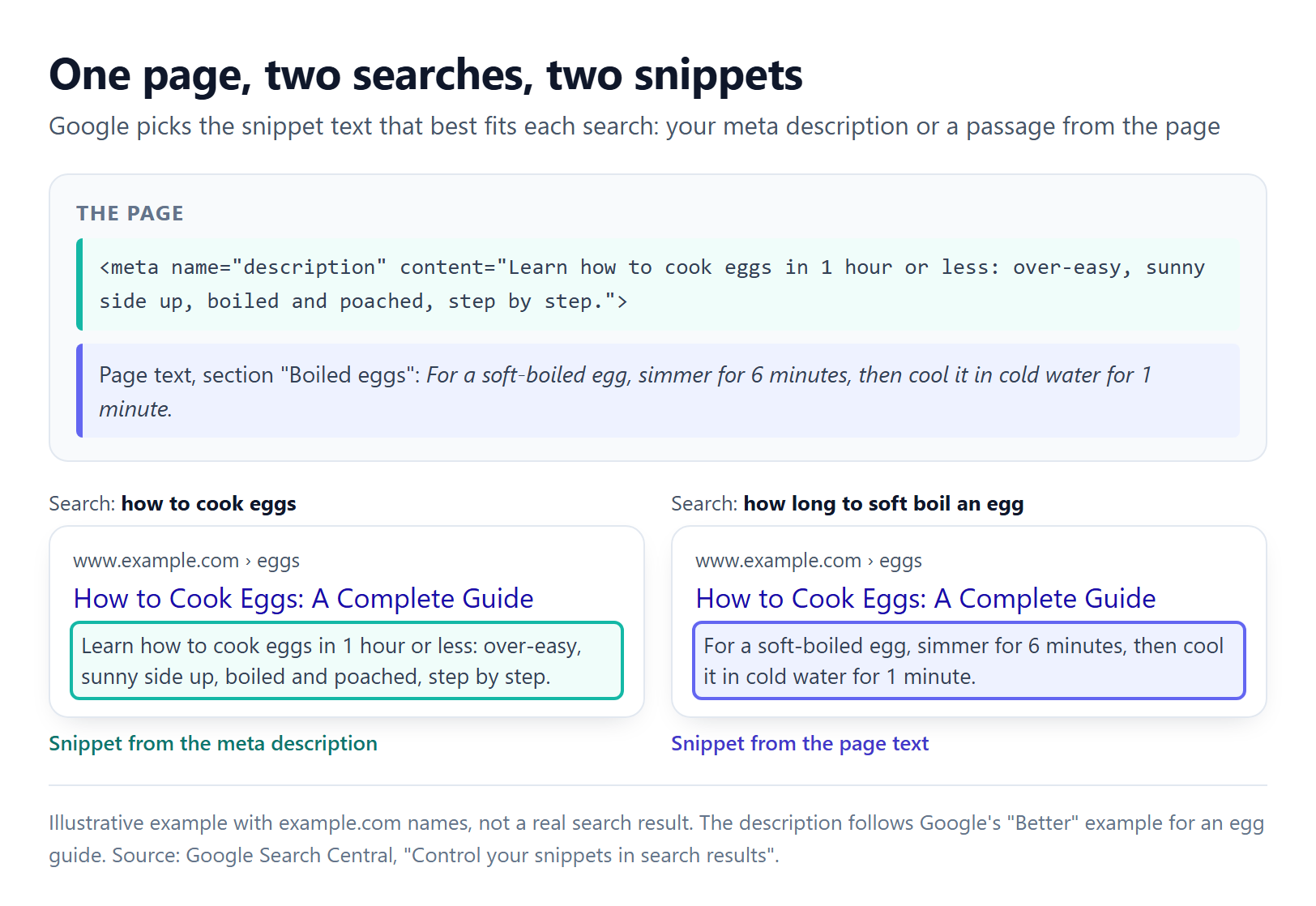
Google has also explained why it ignores some descriptions. A 2017 post on the Search Central Blog named the common problems. Descriptions are sometimes left "completely empty," or "the same meta description is used across multiple (and sometimes many) pages." Others are "completely off-topic, low quality, or outright spammy," and Google wrote that "we prefer to ignore such meta descriptions."
How often Google shows the description you wrote
Two third-party studies from 2020 measured how often Google showed the description a page supplied:
| Study | Method | Finding |
|---|---|---|
| Ahrefs, 2020 | Compared meta descriptions with Google desktop snippets for 20,000 keywords | Google rewrote descriptions 62.78% of the time |
| Portent, 2020 | 30,000 keywords from its clients, brand terms removed, desktop and mobile | First-page rewrite rate of 71% on mobile and 68% on desktop |
Treat these as dated observations, not current rates: both were measured in 2020. Portent also found that "the higher the search volume of the keyword, the less likely Google is to rewrite the meta description." In the same way, long-tail queries were more likely to get a snippet from page text.
Does the meta description affect rankings?
No, according to Google's own statements. Its 2007 and 2009 Search Central Blog posts say the description is not used for ranking. A 2007 Search Central Blog post said that "while accurate meta descriptions can improve clickthrough, they won't affect your ranking within search results." A 2009 post on the keywords meta tag repeated it: "we still don't use the description meta tag in our ranking."
Those statements are old. Both posts now carry Google's notice that "Some of the information may be outdated," so treat them as dated statements. Either way, write descriptions for searchers, not for rankings. A good description helps a searcher see that your page answers their question.
How long should a meta description be?
Google sets no limit. Its documentation says: "There's no limit on how long a meta description can be, but the snippet is truncated in Google Search results as needed, typically to fit the device width." In other words, the cut-off depends on the screen, not on a fixed character count.
For reference, Portent's 2020 study observed that on desktop, without a date shown, "fully-displayable meta descriptions are going to be between 150 and 160 characters." On mobile, again without a date, it found that Google gave itself "around 114 to 121 characters" for snippets. Ahrefs found that "keeping your meta descriptions within limits doesn't change the probability of Google rewriting them much."
Our suggestion follows from those observations. Put the most useful information in the first 110 characters or so, then add detail. Don't cut useful facts just to hit a number.
How to write a meta description
Google's SEO Starter Guide gives the target: "A good meta description is short, unique to one particular page, and includes the most relevant points of the page." The snippet documentation adds four practices:
- Create unique descriptions for each page. "Identical or similar descriptions on every page of a site aren't helpful when individual pages appear in search results."
- Include relevant facts. "The meta description doesn't just have to be in sentence format." For example, articles can list the author or date, and product pages can bring together price, age and manufacturer.
- Generate descriptions programmatically where needed. For large database-driven sites, Google says "programmatic generation of the descriptions can be appropriate and are encouraged."
- Make them truly descriptive. Google warns that "meta descriptions comprised of long strings of keywords don't give users a clear idea of the page's content, and are less likely to be displayed as a snippet."
Google's own examples show the difference:
| Bad | Better |
|---|---|
| "Sewing supplies, yarn, colored pencils, sewing machines, threads, bobbins, needles" (a keyword list) | "Get everything you need to sew your next garment. Open Monday-Friday 8-5pm, located in the Fashion District." |
| "Mechanical pencil" (too short) | "Self-sharpening mechanical pencil that autocorrects your penmanship. Includes 2B auto-replenishing lead. Available in both Vintage Pink and Schoolbus Yellow. Order 50+ pencils, get free shipping." |
Source: Google Search Central, "Control your snippets in search results", read November 2026.
Description patterns by page type
These patterns are BACKLNK's suggestions built on Google's practices, with example.com names. Adapt them to what your searchers need to know before they click.
| Page type | What to include | Example |
|---|---|---|
| Home page | What the site offers, for whom, one distinguishing fact | Seeds, tools and plants for home gardeners in Ohio, with next-day delivery in Columbus. |
| Article or guide | The answer or outcome, and what the guide covers | Prune tomato plants in three steps for a bigger harvest: when to cut, which shoots to remove and how to avoid disease. |
| Product page | Name, key specs, price or availability | Bypass pruning shears with a 21 mm cut and steel blades. $34, in stock, free returns for 30 days. |
| Category page | What the range covers and how to narrow it | 120 organic vegetable seed varieties for raised beds, sorted by sowing month and growing zone. |
| Local page | Service, place and a practical detail | Garden design in Columbus, Ohio: site visit, planting plan and quote within one week. |
Example: rewriting a category page description
This illustrative before-and-after uses an example.com garden shop. The first version is the keyword list Google warns against; the second applies its advice to describe the page and include its key facts.
| Description | |
|---|---|
| Before | Vegetable seeds, organic seeds, seeds for sale, buy seeds online, garden seeds |
| After | Organic vegetable seeds for raised beds: 120 varieties, sorted by sowing month and growing zone, each with spacing and harvest times. |
The after version tells a searcher what the category contains and how it's organized. It also differs from every other category description on the site, because the facts come from this page.
Which pages deserve hand-written descriptions
You rarely have time to write a description for every page. Google suggests you "prioritize your content; at the very least, create a description for the critical URLs like your home page and popular pages." This table turns that into a decision:
| Page group | Approach | Why |
|---|---|---|
| Home page and main section pages | Write by hand | Google recommends site-level descriptions here |
| Pages with the most impressions in Search Console | Write by hand | They're shown most often, so a clear description matters most |
| Product, listing and location pages | Generate from page data | Facts such as price, size and place are usually stored as fields |
| Articles and guides | Write when you publish | Google notes that when each article is hand-written, adding a one-sentence description takes minimal effort |
| Long-tail and archive pages | Generate, or leave out | Google builds the snippet from page text when no description fits |
Generating descriptions for large sites
A generated description should read like a sentence written for that page, not a list. Google says "Good descriptions are human-readable and diverse" and "Page-specific data is a good candidate for programmatic generation."
This illustrative template, in pseudo-code, builds a product description from fields and falls back gracefully:
parts = [product.name + ": " + product.one_line_summary]
if product.key_spec:     parts.append(product.key_spec)
if product.price:        parts.append(product.price + ", " + product.availability)
description = join(parts, ". ")
if description is empty or equals the category default:
    leave the tag out and let Google use the page text
After that, check the output across the template. Look for identical descriptions, descriptions that differ only in one number, and empty fields that produce stray punctuation. Identical descriptions often point to near-duplicate pages; our guide to duplicate content covers how to handle those.
Controlling or blocking snippets
You can't force Google to show your description, but you can limit snippets. Google's robots meta tag specification documents three controls:
nosnippet: "Do not show a text snippet or video preview in the search results for this page." Google adds that it "will also prevent the content from being used as a direct input for AI Overviews and AI Mode."max-snippet:[number]: "Use a maximum of [number] characters as a textual snippet for this search result."data-nosnippet: an attribute onspan,divandsectionelements that excludes those parts of the page from snippets.
Note that these rules restrict snippets. They don't make Google prefer your meta description. Restricting snippets also limits how your text can appear in Google's AI features. Our guide to writing passages worth quoting in AI answers covers that side.
How to check your meta description
- Check the served tag. View the page source and find the description, or run the page through BACKLNK's Meta Tags & Social Preview checker. It lists every meta tag with its source line and previews the search result from what you supply. Google may rewrite descriptions, so the preview shows your text, not a guaranteed snippet.
- Check for one description per page. Make sure a plugin or theme hasn't added a second description tag. The HTML standard allows one per document.
- Compare with sibling pages. Google names duplicated or near-identical descriptions across a site as unhelpful, so check every template.
- Search for the page. Try a broad query and a specific question. Note which one shows your description and which shows page text.
- Measure in Search Console. The Performance report shows impressions and clicks per page. Compare a period after Google recrawls the page with a comparable period before. Rankings and the other results on the page also change clicks, so read the change as one signal.
Finally, a description should match what the page is for. Our guide to search intent covers how to give each page one clear purpose.
Frequently asked questions
- Why does Google show different text than my meta description?
- Google builds snippets mainly from the page content and picks the text that best fits each search. It uses your description when it describes the page more accurately for that search. Empty, duplicated, off-topic or keyword-stuffed descriptions are likely to be ignored.
- Does every page need a meta description?
- No. Google recommends descriptions at least for critical pages such as the home page and popular pages. For pages without one, Google uses text from the page.
- Is the meta description a ranking factor?
- Google's 2007 and 2009 Search Central Blog posts say the description doesn't affect ranking. Those posts are old, so treat them as dated statements. A clear description can still help searchers choose your result.
- What is the ideal meta description length?
- There is none in Google's documentation. Snippets are cut to fit the device width. Third-party measurements from 2020 found full desktop descriptions around 150 to 160 characters, so put the key information early.
- Can I use the same description on several pages?
- Avoid it. Google says identical or similar descriptions aren't helpful when individual pages appear in results. Use a site-level description on the home page and page-level descriptions elsewhere.
How this article was produced
- Byline
- Emily Parker
- First published
- Evidence
- External research (cited below)
- Editorial interpretation
Sources
- Control your snippets in search results, Google Search Central (accessed Nov 22, 2026)
- Meta tags and attributes that Google supports, Google Search Central (accessed Nov 22, 2026)
- HTML Living Standard: 4.2 Document metadata, WHATWG (accessed Nov 22, 2026)
- Robots meta tag, data-nosnippet, and X-Robots-Tag specifications, Google Search Central (accessed Nov 22, 2026)
- SEO Starter Guide: The Basics, Google Search Central (accessed Nov 22, 2026)
- Improve snippets with a meta description makeover, Google Search Central Blog (accessed Nov 22, 2026)
- Google does not use the keywords meta tag in web ranking, Google Search Central Blog (accessed Nov 22, 2026)
- Better Snippets for your Users, Google Search Central Blog (accessed Nov 22, 2026)
- Latest Google Search documentation updates, Google Search Central (accessed Nov 22, 2026)
- How Often Does Google Rewrite Meta Descriptions? (New Data Study), Ahrefs (accessed Nov 22, 2026)
- Study: How Often Google Ignores and Rewrites Our Meta Descriptions, Portent (accessed Nov 22, 2026)
- Using Search Console and Google Analytics data for SEO, Google Search Central (accessed Nov 22, 2026)
- Meta Tags & Social Preview, BACKLNK (accessed Nov 22, 2026)

Keep reading

Search Intent: One Page, One Purpose, and How to Map Queries to Pages
How to work out what a searcher wants, give every page one clear job, map queries to pages without cannibalization, and align title, headings, sections and calls to action.
 by Jordan Lee

Open Graph Tags: How to Control Your Link Previews on Every Platform
Which og: and twitter: tags each platform reads, the share image sizes they document, how previews are cached and how to fix the most common preview problems.
 by Emily Parker

How to Get Cited in AI Answers: Write Passages Worth Quoting
No method guarantees an AI citation. Here is what AI search providers actually document, what you control, and how to write self-contained passages that serve readers and quote cleanly.
by Jordan Lee