JavaScript SEO: How Google Renders Pages, What Breaks and How to Check
Short answer
Google renders JavaScript pages in headless Chromium before indexing them, but content still goes missing when links lack an href, errors return 200, noindex sits in the original HTML or content needs a click. In a 2024 Vercel/MERJ measurement, the major AI crawlers observed didn't run JavaScript.

Written by Miguel Santiago
Published · 11 min read

On this page
How Google crawls, renders and indexes JavaScript pages, the documented mistakes that hide content, which rendering approach to choose and how to check what crawlers see.
JavaScript SEO is the work of making sure search engines can find, render and index content that your JavaScript produces. Google can do this: it runs your JavaScript in an up-to-date version of Chromium before it indexes the page. Content still goes missing when links aren't real links, when errors return a 200 status, when noindex sits in the original HTML or when content waits for a click. And in a study Vercel and MERJ published in December 2024, the major AI crawlers they observed didn't run JavaScript.
This guide explains how Google processes a JavaScript page, the failure points Google documents and how to fix each one. It then compares rendering approaches and shows how to check what crawlers actually see. We built it from Google's JavaScript documentation, web.dev and the AI crawler operators' own pages, read in November 2026, plus two dated measurements by Vercel and MERJ that we label as such.
- Google processes JavaScript pages in three phases: crawling, rendering and indexing. Pages can wait in the render queue for a few seconds or longer.
- The failure points Google documents are fixable in code: use real links with an
href, return real 404s, avoid URL fragments for content and keepnoindexout of the original HTML of pages you want indexed. - Google recommends server-side rendering, static rendering or hydration. It calls dynamic rendering a workaround, not a long-term solution.
- In a study Vercel and MERJ published in December 2024, the major AI crawlers observed did not execute JavaScript. Put important content in the HTML response.
- Check the rendered HTML in URL Inspection or the Rich Results Test, and compare it with the raw HTML your server sends.
How Google processes JavaScript pages
Google's JavaScript SEO basics describe three phases: crawling, rendering and indexing. Each phase can stop your content before the next one starts.
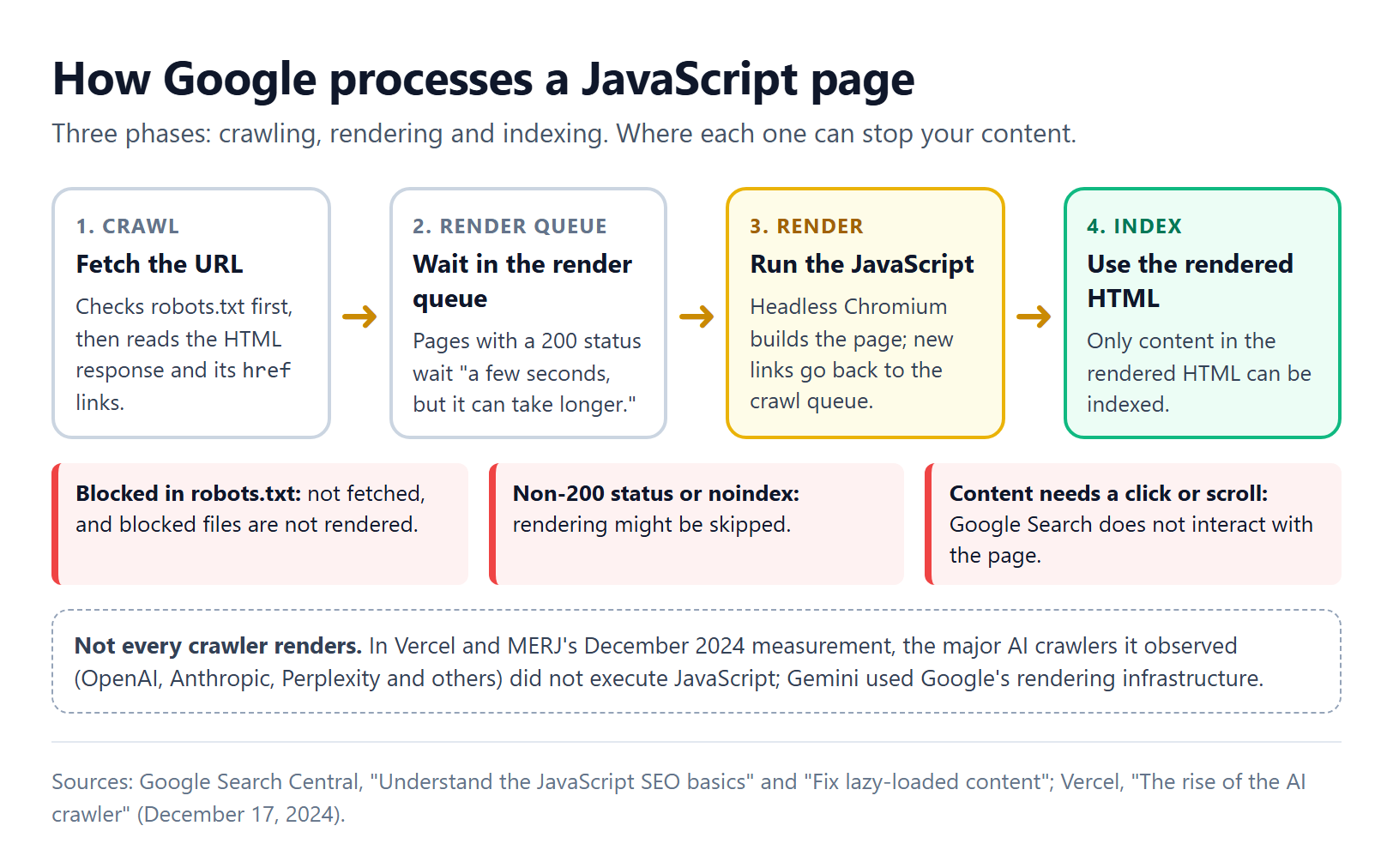
Crawling. Googlebot first checks robots.txt. If a URL is disallowed, it skips the request, and Google says that "Google Search won't render JavaScript from blocked files or on blocked pages." It then parses the HTML response for links in href attributes.
Rendering. Googlebot queues every page that returns a 200 status for rendering, unless a robots meta tag or header tells Google not to index it. A page "may stay on this queue for a few seconds, but it can take longer than that." When resources allow, a headless Chromium renders the page and runs the JavaScript. Links found in the rendered HTML go back into the crawl queue.
Indexing. Google uses the rendered HTML to index the page. Content that never appears in the rendered HTML can't be indexed.
Status codes also affect whether rendering happens: for a page with a non-200 status, such as an error page that returns 404, rendering might be skipped. The same page gives a broader reason to send real HTML: "server-side or pre-rendering is still a great idea because it makes your website faster for users and crawlers, and not all bots can run JavaScript."
How long does rendering take?
There's no fixed time in Google's documentation, but one outside measurement gives a sense of scale. Vercel and MERJ analyzed over 100,000 Googlebot fetches in April 2024, mostly on nextjs.org plus two other sites. They measured a median rendering delay of 10 seconds, about 3 hours at the 90th percentile and about 18 hours at the 99th percentile. Excluding errors and non-indexable pages, 100% of the HTML pages in that sample resulted in full-page renders. That's one study on three sites, mostly nextjs.org, so treat it as an example rather than a guarantee for yours.
What breaks JavaScript SEO, and how to fix it
Google's troubleshooting guide and its basics page document the same failure points. Each one has a direct fix.
| Problem | What happens | Fix |
|---|---|---|
Links without an href |
Google can't reliably extract URLs from <a> elements without an href or from script-only "links" |
Use <a href="/path"> and add JavaScript behavior on top |
| Content behind URL fragments | #/products-style routing isn't reliable for Googlebot |
Use the History API and real paths |
| Soft 404s in single-page apps | Client-side error views can return a 200 status and get indexed as pages | Redirect to a URL that returns 404, or add noindex with JavaScript |
noindex in the original HTML |
Google may skip rendering, so JavaScript that removes noindex may never run |
Leave noindex out of the original HTML of pages you want indexed |
| Canonical changed by JavaScript | Conflicting or multiple canonicals can lead to unexpected results | Set the canonical in HTML; if JavaScript sets it, use the same value |
| Blocked JavaScript or CSS | Google won't render JavaScript from blocked files | Allow crawling of the resources needed to render |
| Lazy loading on scroll or click | Google Search doesn't interact with the page | Load content when it's visible in the viewport |
| Storage, cookies and permissions | Storage and cookies are cleared across page loads; permission requests are declined | Don't make content depend on stored state or permissions |
| Very large files | Googlebot fetches the first 2MB of each HTML, JavaScript or CSS file | Keep critical content and code within the limit, measured uncompressed |
| Stale cached resources | Google's renderer may ignore caching headers and use old files | Use content fingerprinting in file names |
Source: Google Search Central JavaScript, links, lazy-loading and Googlebot documentation, read November 2026.
Make every link a real link
Google's link best practices are direct: "Generally, Google can only crawl your link if it's an <a> HTML element (also known as anchor element) with an href attribute." Links that JavaScript inserts are fine, as long as they use the same markup. These examples are illustrative:
<!-- Crawlable: a real URL in href, JavaScript added on top -->
<a href="/products/garden-tools" onclick="router.go(event)">Garden tools</a>

<!-- Not reliably crawlable -->
<a onclick="router.go('/products/garden-tools')">Garden tools</a>
<span data-href="/products/garden-tools">Garden tools</span>
<a href="#/products/garden-tools">Garden tools</a>
The last example uses a URL fragment. Google's troubleshooting guide says "you can't rely on URL fragments to work with Googlebot" and recommends the History API instead. In practice, every view that should be findable in search needs its own path, such as /products/garden-tools.
Return real errors in single-page apps
In a single-page app, a "product not found" view often comes back with a 200 status. Google warns that this "can lead to error pages being indexed and possibly shown in search results." It documents two fixes. You can redirect to a URL where the server returns a 404, or add a noindex robots meta tag with JavaScript. This illustrative version of the first fix follows Google's pattern:
fetch(`/api/products/${productId}`)
  .then((response) => response.json())
  .then((product) => {
    if (product.exists) {
      showProductDetails(product);
    } else {
      // The server answers /not-found with a real 404 status.
      window.location.href = "/not-found";
    }
  });
On a server-rendered site, the simpler fix is to send the 404 status with the response itself.
Keep noindex and canonical tags in the HTML
Two rules about robots and canonical tags are easy to get wrong on JavaScript sites.
First, noindex. When Google finds a noindex tag in the page, it may skip rendering and JavaScript execution. As a result, using JavaScript to change or remove noindex "may not work as expected." So a template that ships noindex and removes it after loading data can keep the page out of the index. If you want the page indexed, don't put noindex in the original page code.
Second, the canonical URL. Google calls HTML "The best way to set the canonical URL." If you have to use JavaScript, always set the canonical to the same value as in the original HTML. If JavaScript injects one, it must be the only rel="canonical" link on the page. Our guide to duplicate content explains how Google chooses a canonical in the first place.
<!-- Illustrative: canonical in the server response, not added later -->
<head>
  <title>Garden tools - Example Garden Co.</title>
  <link rel="canonical" href="https://www.example.com/products/garden-tools">
</head>
Titles, meta descriptions and structured data set by JavaScript
You can generate page metadata with JavaScript. Google's basics page says "You can use JavaScript to set or change the meta description as well as the title element." Structured data works the same way: Google's guide to generating structured data with JavaScript names Google Tag Manager and custom JavaScript as the most common methods. It also asks you to test the result with the Rich Results Test.
For Google, what matters is that these tags end up in the rendered HTML, which is what it indexes. Crawlers that don't run JavaScript only see the tags in your server's response. If titles, descriptions or structured data matter beyond Google, send them in the HTML.
Load lazy content without interaction
Google's lazy-loading guide says your implementation should load "all relevant content whenever it is visible in the viewport." It lists browser built-in lazy loading, the IntersectionObserver API and libraries that load data when it enters the viewport. Those methods work because "Google Search does not interact with your page." Content that appears only after a click, a hover or a scroll event may never be seen. For infinite scroll, Google asks for a persistent, unique URL for each chunk. Our guide to image SEO covers lazy-loaded images in more detail.
Mind file size and caching
Googlebot has a per-file limit. Its Googlebot documentation says it crawls the first 2MB of each supported file type. Each resource referenced in the HTML, such as CSS and JavaScript, is fetched separately, and the limit applies to the uncompressed data. A huge bundle or an HTML page with megabytes of inline data can be cut off.
Caching is the other trap. Google's renderer "may ignore caching headers," which can lead it to use outdated JavaScript or CSS. Google recommends content fingerprinting, such as main.2bb85551.js, so each update gets a new file name. In a December 2024 post, Google added that its renderer caches resources for up to 30 days and that blocking resources from crawling usually causes rendering problems.
Which rendering approach is best for JavaScript SEO?
The rendering approach decides how much of your page exists before any JavaScript runs. web.dev's Rendering on the Web defines the first four options below, and Google's dynamic rendering page covers the fifth. The last column is our reading:
| Approach | What the server sends | Fit for search and AI crawlers |
|---|---|---|
| Server-side rendering (SSR) | Full HTML, built per request | Content is in the response; good for pages that change often |
| Static rendering | Full HTML, built at build time | Content is in the response; good for pages that rarely change |
| Hydration | Server HTML, then scripts add interactivity | Content is in the response, interactivity comes after |
| Client-side rendering (CSR) | A shell; JavaScript builds the content | Depends on rendering; Google renders, the AI crawlers in Vercel and MERJ's study did not |
| Dynamic rendering | Pre-rendered HTML for bots only | Google calls it a workaround, not a long-term solution |
In web.dev's terms, server-side rendering sends HTML, rather than JavaScript, to the client. The same guide notes that "Crawlers can understand JavaScript, but there are often limitations to how they render." Client-side rendering means "Rendering an app in a browser, using JavaScript to modify the DOM."
Google's dynamic rendering page now opens with a warning: "Dynamic rendering was a workaround and not a long-term solution for problems with JavaScript-generated content in search engines." Instead, it recommends server-side rendering, static rendering or hydration. If you still run dynamic rendering, Google doesn't treat it as cloaking as long as it "produces similar content."
In practice, put main content, titles, meta descriptions, canonical tags, structured data and navigation links in the HTML response. Then use client-side JavaScript for interactivity, such as filters, calculators and widgets.
Do AI crawlers run JavaScript?
The AI crawler operators don't say. OpenAI's crawler overview explains what each crawler is for: "OAI-SearchBot is used to surface websites in search results in ChatGPT's search features." Anthropic's crawler page and Perplexity's crawler documentation describe their bots in the same way, for example "PerplexityBot is designed to surface and link websites in search results on Perplexity." None of the three pages says whether these crawlers run JavaScript.
The clearest public evidence is a measurement. In December 2024, Vercel and MERJ published traffic data from nextjs.org and the Vercel network, checked against two job board sites. They reported that "none of the major AI crawlers currently render JavaScript," naming OpenAI's, Anthropic's, Meta's, ByteDance's and Perplexity's crawlers. ChatGPT and Claude crawlers did fetch JavaScript files but didn't execute them. By contrast, Gemini used Googlebot's infrastructure and could render JavaScript fully, and AppleBot rendered JavaScript too.
Treat that as one vendor's measurement from late 2024, on nextjs.org, the Vercel network and two job board sites; crawler behavior can change without notice. The safe reading for your site is the same either way. Content that exists only after client-side rendering may be invisible to some AI systems, so important content belongs in the HTML response. Crawler access is a separate question: our guide to AI crawlers and robots.txt covers which bots you allow.
How to check what Google and other crawlers see
You need two views of every important template: the raw HTML your server sends and the HTML after rendering.
- Read the raw HTML. Use your browser's "view source" (not the developer tools' Elements panel, which shows the rendered DOM), or fetch the URL with a command-line tool. Check that the main content, title, meta description, canonical, robots meta tag and links are present.
- Read the rendered HTML. Google recommends the Rich Results Test or the URL Inspection Tool in Search Console. There "You can see loaded resources, JavaScript console output and exceptions, rendered DOM, and more information." Search the rendered HTML for a sentence from your main content.
- Compare the two. Anything that appears only in the rendered HTML depends on JavaScript. That's fine for Google if rendering works. For AI crawlers that don't render, it's missing.
- Check status codes. Request a URL that shouldn't exist, such as a deleted product. It should return 404, not 200. Our guide to pages that aren't indexed helps when a page is missing for another reason.
- Check metadata and indexing signals. BACKLNK's Meta Tags & Social Preview checker reads every meta tag on one page; its page says to choose Rendered if tags are added by JavaScript. The Indexability Checker checks HTTP status, redirects, robots.txt, meta robots, X-Robots-Tag, canonical and sitemap presence, with one verdict per URL. As its page notes, actual index status is only available in Google Search Console.
Frequently asked questions
- Can Google index JavaScript websites?
- Yes. Google renders pages with an evergreen version of Chromium and indexes the rendered HTML. Problems come from specific mistakes, such as links without an href , error pages that return 200, noindex in the original HTML or content that needs a click to load.
- Is client-side rendering bad for SEO?
- Not for Google by itself, if your links, status codes and metadata are correct. It adds a rendering step that can be delayed, and it leaves content invisible to crawlers that don't run JavaScript. Google still calls server-side or pre-rendering "a great idea."
- Is dynamic rendering still recommended?
- No. Google describes dynamic rendering as a workaround and not a long-term solution. It recommends server-side rendering, static rendering or hydration instead.
- Do ChatGPT and other AI crawlers run JavaScript?
- Their operators' documentation doesn't say. A study Vercel and MERJ published in December 2024 found that the major AI crawlers it observed, including OpenAI's and Anthropic's, did not execute JavaScript, while Gemini used Google's rendering infrastructure.
- How do I see the rendered HTML Google uses?
- Use the URL Inspection Tool in Search Console for pages on your property, or the Rich Results Test for any public URL. Both show the rendered HTML, loaded resources and JavaScript console messages.
How this article was produced
- Byline
- Miguel Santiago
- First published
- Evidence
- External research (cited below)
- Editorial interpretation
Sources
- Understand the JavaScript SEO basics, Google Search Central (accessed Nov 22, 2026)
- Fix Search-related JavaScript problems, Google Search Central (accessed Nov 22, 2026)
- Dynamic rendering as a workaround, Google Search Central (accessed Nov 22, 2026)
- Fix lazy-loaded website content, Google Search Central (accessed Nov 22, 2026)
- Rendering on the Web, web.dev (Google) (accessed Nov 22, 2026)
- SEO link best practices for Google, Google Search Central (accessed Nov 22, 2026)
- What is Googlebot, Google Search Central (accessed Nov 22, 2026)
- Crawling December: The how and why of Googlebot crawling, Google Search Central Blog (accessed Nov 22, 2026)
- The rise of the AI crawler, Vercel (accessed Nov 22, 2026)
- How Google handles JavaScript throughout the indexing process, Vercel (accessed Nov 22, 2026)
- Overview of OpenAI crawlers, OpenAI (accessed Nov 22, 2026)
- Does Anthropic crawl data from the web, and how can site owners block the crawler?, Anthropic (accessed Nov 22, 2026)
- Perplexity crawlers, Perplexity (accessed Nov 22, 2026)
- Meta Tags & Social Preview, BACKLNK (accessed Nov 22, 2026)
- Indexability Checker, BACKLNK (accessed Nov 22, 2026)
- Generate structured data with JavaScript, Google Search Central (accessed Nov 22, 2026)

Keep reading

Page Not Indexed? How to Find the Exact Cause, Step by Step
A step-by-step way to find why Google hasn't indexed a page: read the Search Console status, check the signals in the right order, fix the cause and confirm it.


How to Block AI Crawlers with robots.txt Without Leaving AI Search
AI companies run separate bots for training, AI search and user requests. Here are the documented tokens, how robots.txt matching works and copy-ready configurations.


Duplicate Content and SEO: What Google Does and How to Fix It
How Google handles duplicate pages, why ordinary duplication isn't a penalty, where duplicates come from, and how to choose and signal the canonical you want.