Crawl Budget: When It Matters and How to Check It in Search Console
Short answer
Crawl budget is the set of URLs Google can and wants to crawl on your site, set by your server's crawl capacity and Google's crawl demand. Most sites don't need to manage it; it matters for very large or fast-changing sites and sites with many URLs discovered but not indexed.

Written by Miguel Santiago
Published · 10 min read
On this page
When crawl budget matters, how to read Search Console's Crawl Stats report, what wastes crawling and the fixes Google documents, including what not to do.
Crawl budget is the set of URLs Google can and wants to crawl on your site. It depends on how much crawling your server can handle (the crawl capacity limit) and how much Google wants to crawl (crawl demand). Most sites don't need to manage it. Google's guide targets very large or fast-changing sites, and sites with many URLs stuck as "Discovered - currently not indexed".
If your site fits one of those groups, this guide shows how to confirm a crawl problem in Search Console's Crawl Stats report and which fixes Google documents. We built it from Google's crawling documentation, its Search Console Help and its Search Central Blog, read in November 2026.
- Crawl budget combines the crawl capacity limit (what your server can take) and crawl demand (what Google wants to crawl).
- Google's guide targets large or fast-changing sites. For most sites, an up-to-date sitemap and the Page Indexing report are enough.
- The Crawl Stats report shows requests, response times, host status and crawls by response, file type and purpose.
- Much of the waste comes from URLs you didn't mean to offer: faceted navigation, duplicates, soft 404s and long redirect chains.
- Don't use
noindexor temporary robots.txt blocks to save crawl budget. Google advises against both.
What crawl budget is
Google explains why limits exist: "The web is a nearly infinite space, exceeding Google's ability to explore every publicly accessible URL." As a result, it limits the time and resources it spends on any one site. That allocation is the site's crawl budget.
The budget has two parts, both described in Google's guide Optimize your crawl budget:
- Crawl capacity limit. This is how much crawling your server can handle. Google's guide says that "Every site starts with the same default, conservative crawl capacity limit." The limit rises when your site responds quickly and consistently. It falls when the site slows down or returns server errors or rate-limiting signals such as HTTP 429.
- Crawl demand. This is how much Google wants to crawl. For Googlebot, demand depends on "a site's size, update frequency, page quality, and relevance, compared to other sites." The factors you can influence are your URL inventory, popularity and staleness.
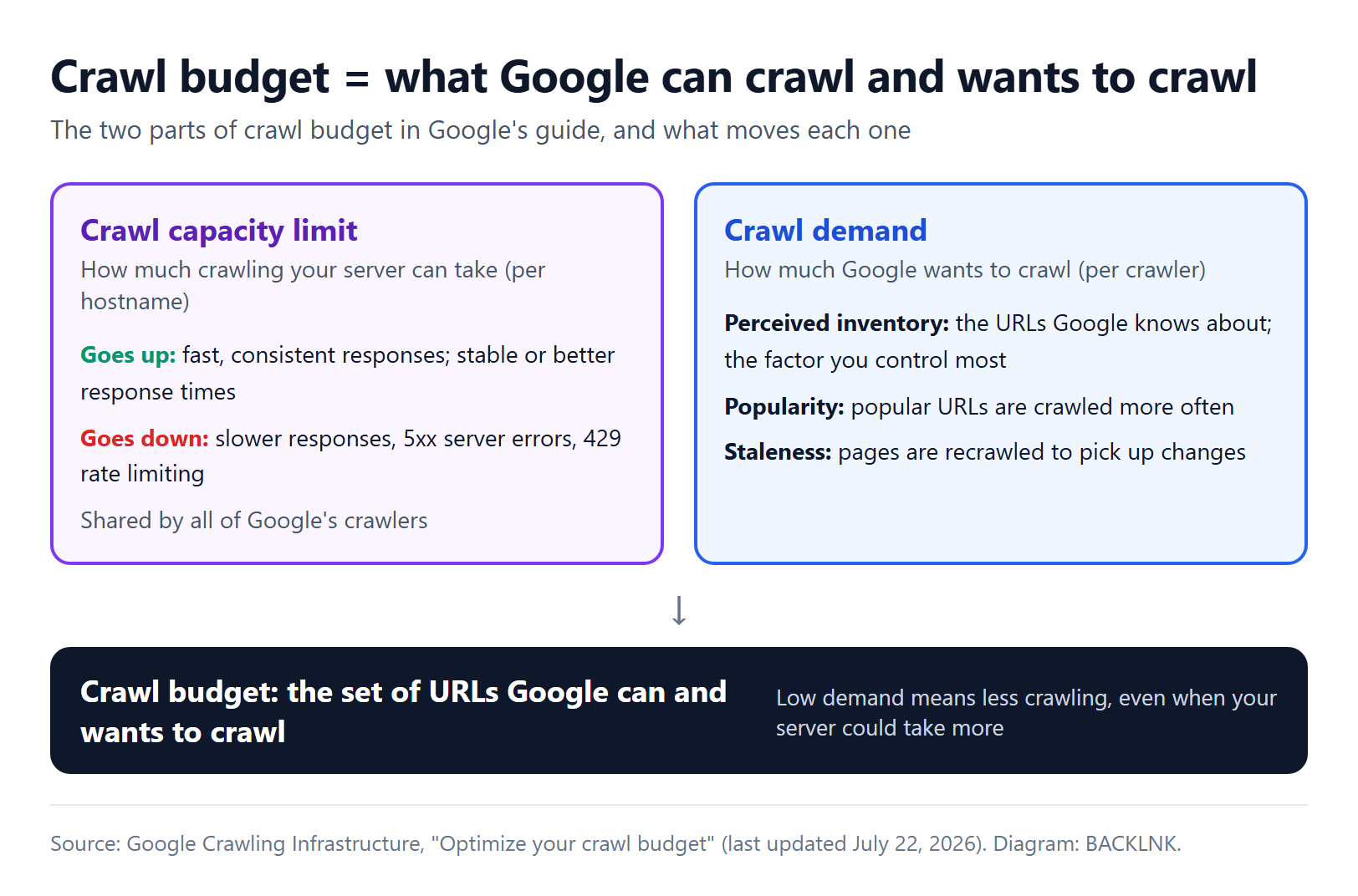
Putting both together, Google "defines a site's crawl budget as the set of URLs that Google can and wants to crawl." A fast server alone doesn't raise crawling: "Even if the crawl capacity limit isn't reached, if crawl demand is low, Google will crawl your site less."
Two details are easy to miss. First, each hostname is its own site: "https://www.example.com/ and https://code.example.com/ are treated as separate sites and have separate crawl budgets." Second, the capacity limit is shared: "the crawl capacity limit is shared across all crawlers." Heavy demand from one Google crawler can therefore leave less for others.
Google moved this guide and its other crawling documentation from Search Central to a separate crawling documentation site in late 2025, because the same crawlers serve products beyond Search.
Does crawl budget matter for your site?
For most sites, it doesn't. Google's guide says: "If your site doesn't have a large number of pages that change rapidly, or if your pages seem to be crawled the same day that they are published, you don't need to read this guide." For Google Search, it adds, "keeping your sitemap up to date and checking the Page Indexing report regularly is adequate."
| Your site | What Google's documentation suggests |
|---|---|
| Fewer than about 1,000 pages | You "should not need to use" the Crawl Stats report. Keep your sitemap current. |
| A few thousand to tens of thousands of pages that change slowly | Our reading: crawl budget is rarely the cause of indexing problems. Look at quality, duplicates and links first. |
| 10,000+ unique pages with content that changes daily | You're in the audience for Google's crawl budget guide. |
| 1 million+ unique pages that change about weekly | You're in the audience for Google's crawl budget guide. |
| A large share of URLs marked "Discovered - currently not indexed" | You're in the audience for Google's crawl budget guide, whatever the site size. |
Google adds that these numbers "are a rough estimate to help you classify your site. These are not exact thresholds." The row marked "Our reading" is our interpretation of Google's guidance, not a threshold Google states.
Crawl budget is also not a ranking lever. Google's 2017 post on crawl budget said that "An increased crawl rate will not necessarily lead to better positions in Search results" and that crawling "is necessary for being in the results," but "it's not a ranking signal." Google now marks that post as possibly outdated, so treat it as history. The point still matches the current guide, which is about getting the right URLs crawled, not about rankings.
If a single important page is missing from Google, crawl budget is rarely the reason. Our guide to a page that isn't indexed walks through the more common causes first.
How to read the Crawl Stats report
The Crawl Stats report in Search Console "shows you statistics about Google's crawling history on your website." You reach it from Settings, then Crawl stats. It works only for root-level properties: a Domain property or a URL-prefix property at the root, such as https://example.com.
| Part of the report | What it shows | What a problem looks like |
|---|---|---|
| Total crawl requests | All crawl requests for URLs on your site, successful or not | A sudden spike or drop that you can't explain by a launch, a site move or a sitemap change |
| Total download size | Bytes downloaded during crawling | Growth much faster than your content grows |
| Average response time | Average response time for all resources fetched | A rising trend, often alongside fewer requests |
| Host status | Availability problems with robots.txt fetching, DNS resolution and server connectivity | Anything other than green: Google says "Ideally your host status should be Green" |
| By response | Responses grouped by type, as a share of all requests | A large share of 404s, redirects or 5xx errors; most responses "should be 200" |
| By file type | HTML, images, JavaScript, CSS and other types | Many requests for resources you never meant to be crawled |
| By purpose | Discovery (URLs never crawled before) and Refresh (recrawls of known pages) | Few discovery crawls after you publish many new pages |
| By Googlebot type | Smartphone, Desktop, Image, Page resource load, AdsBot and others | A spike from one crawler type, such as AdsBot after new Dynamic Search Ads targets |
Read it with these details in mind:
- Redirects count as separate requests. If page1 redirects to page2, which redirects to page3, Google records three requests. Chains therefore inflate the totals.
- Data is per URL requested, not per canonical. Parameter variants and duplicates show up as separate requests.
- Example URLs are samples. Google says they "are not comprehensive, but just a representative example."
- robots.txt availability is critical. If Google can't get a successful robots.txt response, it stops crawling your site for the first 12 hours. A 404 for robots.txt counts as success; a 429 or 5xx does not.
For a complete record, Google recommends your server logs. Its December 2024 post on Googlebot crawling says "The best source to analyze what resources Google is crawling is the site's raw access logs."
What wastes crawl budget, and the documented fix
Google's guide says the inventory of URLs is "the factor that you can positively control the most." Without guidance, Google tries to crawl all or most of the URLs it knows about, so every unnecessary URL competes with your important ones.
| Source of waste | Why it costs crawling | What Google documents |
|---|---|---|
| Faceted navigation and filter parameters | Filter combinations create a near-endless number of URLs | Disallow filter parameters in robots.txt if you don't need them indexed; otherwise keep parameters consistent and return 404 for empty combinations |
| Duplicate URLs | Google crawls each URL, not each piece of content | "Eliminate duplicate content to focus crawling on unique content rather than unique URLs." |
| Soft 404 pages | Pages that say "not found" with a 200 status keep getting crawled | Return a real 404 or 410; "soft 404 pages will continue to be crawled, and waste your budget." |
| Permanently removed pages | Google remembers known URLs | Return 404 or 410: "a 404 status code is a strong signal not to crawl that URL again." |
| Long redirect chains | Each hop is a separate request | Link and redirect straight to the final URL; Google says chains "have a negative effect on crawling" |
| Slow responses | Slow or failing responses lower the capacity limit | Improve server response times; support 304 Not Modified |
| Outdated sitemaps | Google uses sitemaps to find content to crawl | Include all the content you want crawled, with accurate lastmod |
| Heavy page resources | CSS, JavaScript and images are crawled too | Use fewer resources and avoid changing resource URLs when content hasn't changed |
On large stores, look at faceted navigation first. In December 2024, Google wrote that "faceted navigation is by far the most common source of overcrawl issues site owners report to us". Its faceted navigation documentation shows a robots.txt pattern like this illustrative version:
user-agent: Googlebot
disallow: /*?*color=
disallow: /*?*size=
disallow: /*?*sort=
allow: /*?category=all$
Adapt the parameter names to your own URLs. Keep the pages you want indexed crawlable, such as each product page and one unfiltered listing. Google calls rel="canonical" and rel="nofollow" "generally less effective in the long term" for this purpose than robots.txt or URL fragments.
Duplicates and redirects have their own guides: see duplicate content and how to fix it and 301 vs 302 redirects. For sitemaps, see XML sitemap best practices.
Page resources count too
Rendering a page means fetching its CSS, JavaScript and images, and each fetch counts. Google's December 2024 post explains that crawling those resources "will chip away from the crawl budget of the hostname that's hosting the resource." Google's renderer caches them for up to 30 days, regardless of your HTTP caching headers. So keep resource URLs stable, because Google warns that if resource URLs change, it "may need to crawl the resources again, even if their contents haven't changed." Don't block resources Google needs for rendering, though, because "disallowing crawling of resources usually causes issues."
Let Google reuse unchanged pages
Google's crawlers support conditional requests. If a page hasn't changed, your server can answer with an HTTP 304 and no body. Google's post on HTTP caching says "We strongly recommend using ETag because it's less prone to errors and mistakes." It also notes how rarely sites use this: cacheable fetches made up 0.017% of Google's total fetches when it wrote the post, down from about 0.026% ten years earlier.
An illustrative exchange looks like this:
GET /guides/pruning HTTP/1.1
Host: www.example.com
If-None-Match: "a1b2c3"

HTTP/1.1 304 Not Modified
ETag: "a1b2c3"
Three fixes that don't work
Some common crawl budget advice contradicts Google's documentation:
- Using
noindexto save crawling. Google's guide says: "Don't use noindex, as Google will still request, but then drop the page when it sees a noindex meta tag or header in the HTTP response, wasting crawling time." - Blocking sections temporarily to shift budget elsewhere. Google's guide says not to "use robots.txt to temporarily reallocate crawl budget for other pages." Google "won't shift this newly available crawl budget to other pages unless Google is already hitting your site's crawl capacity limit." Blocked URLs also "stay part of your crawl queue much longer."
- Relying on
nofollowinternal links. Google's 2017 post noted that a URL marked nofollow "can still be crawled if another page on your site, or any page on the web, doesn't label the link as nofollow."
Two older controls don't help either. Google's 2017 post noted that Googlebot doesn't process the non-standard crawl-delay rule. Google also deprecated the crawl rate limiter tool in Search Console on January 8, 2024; Googlebot slows down automatically when your server responds more slowly.
How to get more crawl budget
Google names two ways. First, add server resources if your server is the bottleneck, for example when URL Inspection reports "Hostload exceeded". Second, improve your content's quality for the Google product you're targeting; for Search, Google lists "popularity, overall user value, content uniqueness, and serving capacity."
In practice, this means removing the URLs that shouldn't exist and making the rest fast. Three BACKLNK tools help with these checks. However, they don't show Google's crawl data, which only Search Console and your logs have.
- The Sitemap Hygiene Auditor checks sitemap validity, duplicates and
lastmodpatterns, and verifies a sample of up to 40 destination URLs for status, redirects, canonical and noindex. - The Indexability Checker checks status, redirects, robots.txt, meta robots,
X-Robots-Tag, canonical and sitemap presence for up to 50 URLs. "Indexable" means nothing blocks indexing, not that Google has indexed the page. - The Redirect & HTTP Header Checker follows a redirect chain hop by hop and reviews caching headers, so you can find chains to shorten.
When Googlebot crawls too much
Sometimes the problem is the opposite: crawling overloads your server. Google's guide to reducing the crawl rate says the most common causes are faceted navigation, calendars with many date URLs and Dynamic Search Ad targets. Check your access logs first.
For an emergency lasting a few hours or 1–2 days, Google says to "return a 500, 503, or 429 HTTP response status code instead of 200 to the crawl requests." Google then reduces crawling across the whole hostname and increases it again once the errors stop. With a 503 or 429, you can add a Retry-After header that tells Google's crawlers when to try again:
HTTP/1.1 503 Service Unavailable
Retry-After: 120
Keep it short. Google warns against doing this for longer than 1–2 days: "if Googlebot observes these status codes on the same URL for multiple days, the URL may be dropped from Google's index." If serving errors isn't possible, Google offers a form to report an unusually high crawl rate. You can't request a higher crawl rate.
Frequently asked questions
- Does crawl budget affect rankings?
- Not directly. Crawling only makes a page eligible for indexing, and Google's current guide notes that "not every page that is crawled will necessarily be indexed." Crawl budget matters when Google can't keep up with your new or changed pages.
- How do I know if my site has a crawl budget problem?
- Check whether new pages are crawled the day they're published; if they are, you don't have a crawl budget problem. Warning signs are new pages that wait days or weeks for a crawl and a large share of URLs marked "Discovered - currently not indexed" in the Page Indexing report. Another is a Crawl Stats report where many requests go to redirects, 404s, parameter URLs or resources.
- Do pages blocked by robots.txt use crawl budget?
- Google doesn't crawl blocked URLs, but blocked URLs stay in its crawl queue longer and are recrawled when the block is removed. Blocking also doesn't move budget to other pages unless Google is already hitting your crawl capacity limit.
- Does a faster site get crawled more?
- It can, if Google also wants to crawl more. Google's guide says that if Google can load and render pages faster, it "might be able to read more content from your site." Faster responses raise the crawl capacity limit, but Google still crawls only what it wants to crawl.
- Is crawl budget calculated per domain or per subdomain?
- Per hostname. Google treats www.example.com and code.example.com as separate sites with separate crawl budgets. Resources hosted on another hostname, such as a CDN, count against that hostname's budget.
How this article was produced
- Byline
- Miguel Santiago
- First published
- Evidence
- External research (cited below)
- Editorial interpretation
Sources
- Optimize your crawl budget, Google Crawling Infrastructure (accessed Nov 22, 2026)
- Crawl Stats report, Google Search Console Help (accessed Nov 22, 2026)
- What Crawl Budget Means for Googlebot, Google Search Central Blog (accessed Nov 22, 2026)
- Managing crawling of faceted navigation URLs, Google Crawling Infrastructure (accessed Nov 22, 2026)
- Reduce the Google crawl rate, Google Crawling Infrastructure (accessed Nov 22, 2026)
- Upcoming deprecation of Crawl Rate Limiter Tool in Search Console, Google Search Central Blog (accessed Nov 22, 2026)
- Crawling December: The how and why of Googlebot crawling, Google Search Central Blog (accessed Nov 22, 2026)
- Crawling December: HTTP caching, Google Search Central Blog (accessed Nov 22, 2026)
- Crawling December: Faceted navigation, Google Search Central Blog (accessed Nov 22, 2026)
- Changelog, Google Crawling Infrastructure (accessed Nov 22, 2026)

Keep reading

Page Not Indexed? How to Find the Exact Cause, Step by Step
A step-by-step way to find why Google hasn't indexed a page: read the Search Console status, check the signals in the right order, fix the cause and confirm it.

XML Sitemap Best Practices: Format, Limits, lastmod and Audits
The rules that make an XML sitemap useful: format and limits, sitemap index files, which URLs to list, accurate lastmod, submission, extensions and auditing.

Duplicate Content and SEO: What Google Does and How to Fix It
How Google handles duplicate pages, why ordinary duplication isn't a penalty, where duplicates come from, and how to choose and signal the canonical you want.